Explore the latest Google AI Studio home page Omnibar Chat, historical access to history, usage, tracking, and easier AI application development.
This Google AI Studio home page update features a more streamlined interface to help developers and AI builders make faster progress. With easier access to past chats, more intuitive navigation in AI-powered applications, project usage information, and a brand-new Omnibar for quick actions, the platform is focused on efficiency and workflow clarity.
This update is part of Google’s larger efforts to make the process of generative AI development easier to access and more efficient, using the tools in its model ecosystem, which includes Gemini-based systems and additional advanced AI models. Here is a complete description of what has changed, why it is important, and how it affects developers.
What is Google AI Studio?
Google AI Studio is a web-based development environment that allows users to:
- Explore the generative AI models
- Prototype AI-driven applications
- Test and build prompts
- Monitor API usage
- Transition from testing to production
It uses the Google AI infrastructure, giving access to large language models across multimodal platforms. The platform is commonly used for rapid prototyping, testing conversational AI assistants, and testing programming.
What’s New in the Google AI Studio Home Page Update?
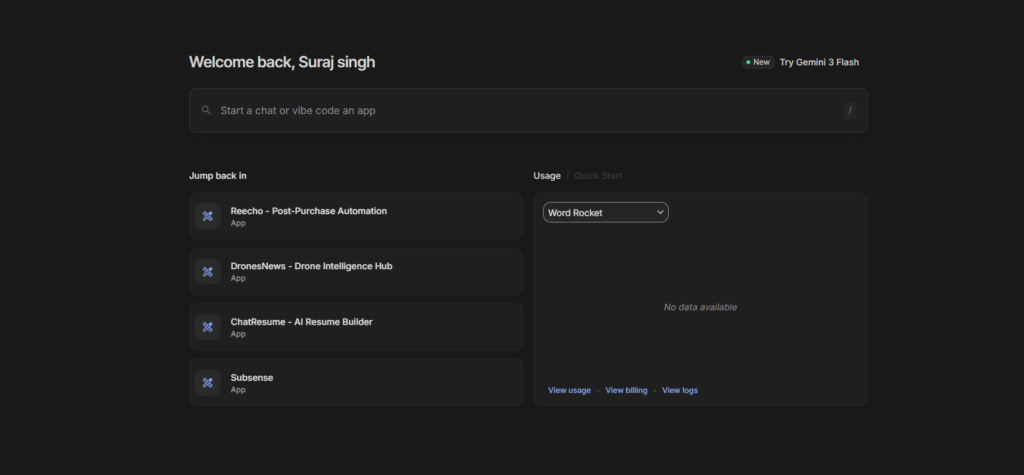
The new homepage is built around four fundamental enhancements:
- Access to more recent chats
- Easy navigation to AI-designed applications
- Clear project usage visibility
- A new Omnibar for quick actions
These improvements aim to ease experimentation and iteration.
1. Faster Access to Past Chats
The most useful change to the Google AI Studio home page update is the ability to retrieve prior conversations.
Why This Matters?
Developers typically:
- Refine prompts in several sessions
- Then, iterate over structured outputs
- Compare previous results
- Reuse conversation-based prototypes
Instead of requiring manual searches through the various projects, the new interface makes it easier to navigate previous sessions. This is particularly useful in the development of prompt-based apps or analyzing output behavior.
2. Easier Access to “Vibe-Coded” Apps
The update increases visibility into previously developed AI applications. These lightweight prototypes, typically developed through quick engineering rather than full backend development, are simpler to find and launch.
Practical Impact
This is compatible with:
- Rapid prototyping
- Reusable AI workflows
- Iterative app development
- Faster demo preparation
Teams that are experimenting with dynamic AI interfaces. This reduces rebuild time and increases consistency.
3. Project Usage Monitoring
Usage transparency is essential when working with AI-based API systems.
The new home page displays the usage of the project more clearly, which allows users to
- Track token consumption
- Monitor API requests
- Manage cost exposure
- Learn scaling patterns
Feature Comparison Table
| Feature | Before Update | After Update |
|---|---|---|
| Chat Access | Nested navigation | Quick access from home |
| App Retrieval | Manual project search | Direct visibility on homepage |
| Usage Insights | Deeper menu access | Surface-level visibility |
| Quick Actions | Multiple clicks | Omnibar central command |
4. The New Omnibar: Centralized Command Access
One of the major highlights of this Google AI Studio home page update is the addition of an Omnibar.
What Is the Omnibar?
The Omnibar is a central command field that allows users to:
- Create new chats
- Launch new projects
- Access sessions before this one
- Jump to usage dashboards
- Initiate app creation
Instead of traversing through multiple menus, developers can start tasks from a single input bar.
Why This Is Important?
For AI developers, speed is key. The Omnibar minimizes UI friction and reduces the process from conception to completion. It aligns with modern development environments that emphasize command-based navigation.
How does the update improve AI Development Workflows?
Traditional Workflow vs Updated Workflow
| Step | Previous Flow | Updated Flow |
|---|---|---|
| Start new AI experiment | Navigate through menu | Omnibar shortcut |
| Reopen past chat | Search project list | One-click access |
| Monitor usage | Open settings panel | Homepage overview |
| Relaunch prototype | Locate inside project | Direct access |
This new design reduces the need for context switching and improves focus.
Why This Update Matters for Developers?
This Google AI Studio home page update highlights three main developments in AI tools:
1. Productivity-Centered Interfaces
Contemporary AI platforms are increasingly focusing on:
- Reduced click depth
- Search-based navigation
- Persistent session memory
These enhancements allow for quicker repetition cycles.
2. Scaling From Experimentation to Production
AI tools typically start as sandbox environments. Over time, developers require:
- Clear cost monitoring
- Project-level management
- Reusable workflows
The new homepage recognizes the fact that people are constructing beyond the limitations of experiments.
3. Growing Adoption of Generative AI
As more businesses integrate generative AI, tools like Google AI Studio must support:
- teams rather than individual developers
- Structured project oversight
- Usage transparency
Benefits of the Google AI Studio Home Page Update
- Faster navigation across projects
- Reduction of friction when starting new builds
- Cost reduction and increased accessibility
- Centralized control via Omnibar
- Greater consistency across sessions
These advantages together support the efficiency of AI application development.
Limitations and Considerations
While the update does improve usability, developers must take into consideration:
- API cost optimization strategies
- Prompt refinement best practices
- Testing of the structure before deployment
- Data handling and security policies
Improvements to interfaces do not eliminate the need for responsible AI development and performance tuning.
Practical Use Cases
The new interface has the following benefits:
- Startups building AI-powered SaaS tools
- Developers prototyping chatbot interfaces
- Product teams testing generative features
- Educators are testing AI workflows
- Enterprises monitoring usage during scaling
By reducing navigation complexity, teams can allocate more time to building rather than managing the surroundings.
My Final Thoughts
This change to Google AI Studio’s home page is a sensible move toward more efficient AI development. With quicker access to past chats, clearer usage monitoring, easier retrieval of AI-designed apps, and new features like the Omnibar, the platform tends to reduce friction throughout the development process.
As the growth rate of generative AI increases, efficient tools become vital. This update positions Google AI Studio as a more efficient, workflow-oriented environment, designed not only for experimentation but also for long-term, sustainable AI creation.
Future improvements are expected to enhance further the usability of projects, their intelligence, and the accessibility of models, and to improve their position within the wider AI model development environment.
FAQs
1. What’s the purpose behind the Google AI Studio home page update?
The update enhances navigation, makes past chats easier to find, displays the project’s usage information, and adds the Omnibar to accelerate process execution.
2. What is the Omnibar in Google AI Studio?
Omnibar is a central command field that lets users quickly initiate chats, connect to projects, and begin work without navigating multiple menus.
3. Do I have the ability to track API use from the new page?
Yes. The newly designed homepage presents project usage details more clearly, allowing developers to assess token consumption and request volume.
4. Does the update alter the AI models that are available?
The update to the homepage focuses on user-friendliness and workflow improvement. Model availability is contingent on the current Google AI products in the system.
5. Is Google AI Studio suitable for production-related applications?
Google AI Studio is commonly employed for prototyping and experiments. Developers can move projects from prototype to production using APIs and infrastructure.
6. What does this update do to aid AI App development?
By reducing navigation time, the update enables faster iteration, more efficient session continuity, and better project monitoring.
Also Read –