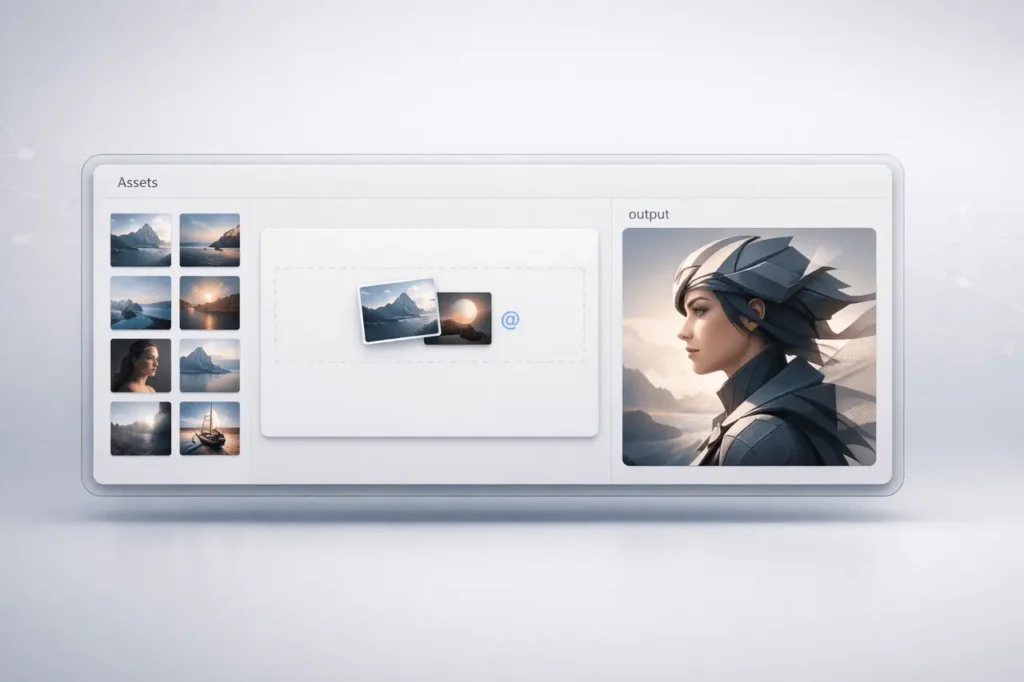
The most recent Flow update brings major improvements designed to simplify AI-powered video and image creation. With drag-and-drop asset support, a redesigned asset grid, and full integration with Nano Banana 2 and Nano Banana Pro, Flow now provides an improved, more efficient creative workflow.
This update focuses on reducing friction between asset management and AI generation. It allows creators to mix character styles, designs, and environments directly within the platform. Here’s a complete breakdown of the new features, why they’re important and how they will improve the creative workflows in real life.
What Is Flow?
Flow has been developed using AI as a platform for creativity, allowing users to create, edit, and animate images and animations through an integrated interface. It integrates asset management with advanced generative models, enabling creators to shift from idea to production without changing tools.
The latest update to Flow strengthens this all-in-1 approach by integrating the latest-generation models and upgrading asset control capabilities.
Drag-and-Drop Assets in the Prompt Box
The most important feature in the Flow update is the ability to drag and drop assets already in this prompt window.
How It Works
Users can now:
- Drag videos or images into the fields of the pop-up prompt
- Utilise the @tag system to refer to stored assets
- Combine multiple assets in a single generation request
The attribute makes it much easier to join:
- Favorite characters
- Established visual styles
- Custom environments
- The assets that were previously generated
Why This Matters?
In the past, referencing assets typically required manual management and external linking. This update will:
- Context is instantly reusable
- Iteration cycles get more efficient
- Visual consistency improves across projects
For creators creating characters with a brand name or recurring themes, this drastically reduces production time.
Improved Asset Grid: Search, Filter, and Collections
The new asset grid is another major enhancement in this Flow update.
Key Capabilities
- Search for videos and images
- Filter assets according to certain criteria
- Sort according to relevancy or metadata
- Themes for collections of group assets
This helps organise large library collections that are ablaze with creativity.
Feature Comparison Table
| Feature | Before Update | After Update |
|---|---|---|
| Asset Search | Limited or manual | Integrated search across media |
| Filtering Options | Minimal | Advanced filtering tools |
| Sorting | Basic | Enhanced sorting controls |
| Collections | Not structured | Themed collections supported |
| Prompt Integration | Manual referencing | Drag-and-drop + @ tag |
This transforms Flow into a more flexible tool for teams of professional designers and creators managing thousands or hundreds of documents.
Nano Banana 2 and Nano Banana Pro Fully Integrated
The most significant technological element of the Flow update is the complete integration of Nano Banana 2 and Nano Banana Pro directly into the platform’s core experience.
Instead of creating files externally and then importing them later, users can now design high-quality outputs in Flow and then immediately utilise the results.
What does this integration enable?
- High-resolution image generation
- Faster iteration cycles
- Editing and animating the direct creation of content
- Smooth shift from generation
There’s no reason to switch between environments or to import/export assets between systems.
How the New Workflow Works?
With the latest version, Flow’s creative workflow gets more efficient:
- Search or choose assets from the enhanced grid
- Simply drag them into your prompt
- Create high-quality visuals with Nano Banana 2 or Pro
- Edit or create animations within Flow
- Sort results into collections
This unified loop increases both creativity and efficiency.
Real-World Applications
The Flow update is compatible with a wide range of use cases across industries.
Use Cases by Industry
| Industry | Application | Benefit |
|---|---|---|
| Digital Art | Character consistency | Faster iteration |
| Marketing | Brand asset reuse | Visual alignment |
| Content Creation | Animated visuals | Streamlined workflow |
| Design Teams | Asset collections | Organized collaboration |
| Media Production | Visual prototyping | Reduced turnaround time |
For professionals who manage several campaigns or creative direction, the asset grid and integrated generation tools can reduce operational complexity.
Benefits of the Latest Flow Update
1. Faster Creative Iteration
Drag-and-drop assets reduce setup time, enabling quicker experimentation.
2. Improved Asset Organisation
Advanced filtering and collections help reduce clutter accumulation and increase scalability.
3. Seamless AI Integration
Nano Banana 2 and Pro work natively in Flow, which eliminates the need to switch between tools.
4. Higher Output Fidelity
Integrated models deliver sophisticated visual results suitable for editing or animation.
5. Centralised Workflow
From selecting assets to the final animation, everything is done in one place.
Limitations and Practical Considerations
While the update substantially improves the functionality of HTML0, users should be aware of:
- Large libraries of assets may require naming conventions structured to optimise search efficiency.
- Workflow improvements depend on how assets can be placed in collections.
- Teams should create tag standards to improve @reference.
These new capabilities are extremely powerful; however, their effect depends on the discipline with which they are used.
Why This Flow Update Matters?
The trend towards integrated generative systems is part of a broader industry effort to reduce friction between AI models and the production environment.
Instead of relying on isolated toolkits, these platforms, such as Flow, are now prioritising :
- embedded AI models
- Context-aware prompts
- Asset continuity
- The cohesion between workflows
It corresponds to the demands of professional creators who need both control and flexibility.
SEO-Relevant Keywords Naturally Covered
- Flow update
- Nano Banana 2 integration
- AI image generation
- Asset management tools
- Creative workflow platform
My Final Thoughts
The most recent Flow update further enhances its status as an innovative connected AI platform. By combining the most sophisticated asset management tools with built-in Nano Banana 2 integration, Flow helps reduce workflow fragmentation and improve productivity.
Drag-and-drop prompting, intelligent asset organisation, and a built-in high-fidelity generation are significant advancements in AI-assisted production. As generative tools grow and become more sophisticated, seamless environments like Flow are likely to be the next stage of digital production for professionals.
FAQs About the Flow Update
1. What’s the biggest improvement made in the most recent Flow update?
The most significant modification is the incorporation of Nano Banana 2 and Nano Banana Pro directly into Flow, enabling high-quality image creation without leaving the Flow platform.
2. What is the process by which drag-and-drop prompting for assets functions?
The user can drop pictures and videos into the prompt boxes or use tags like @ to link to stored assets, allowing multiple elements to be combined into a single generation.
3. How can I arrange my photos into themed collections using Flow?
Yes. The new asset grid lets users sort, filter, search and group assets into collections for better management.
4. Do I have to export my data to access Nano Banana 2 results?
No. Generated outputs are instantly available in Flow for editing or creating animations.
5. Are the new asset grids ideal for libraries with a large number of assets?
Yes. The search, filtering, and sorting tools have been designed to handle large media libraries effectively.
6. Who is the biggest beneficiary of the Flow update? Flow update?
Digital marketing teams, artists, content creators, and designers who manage regular visual themes will experience the greatest productivity gains.
Also Read –