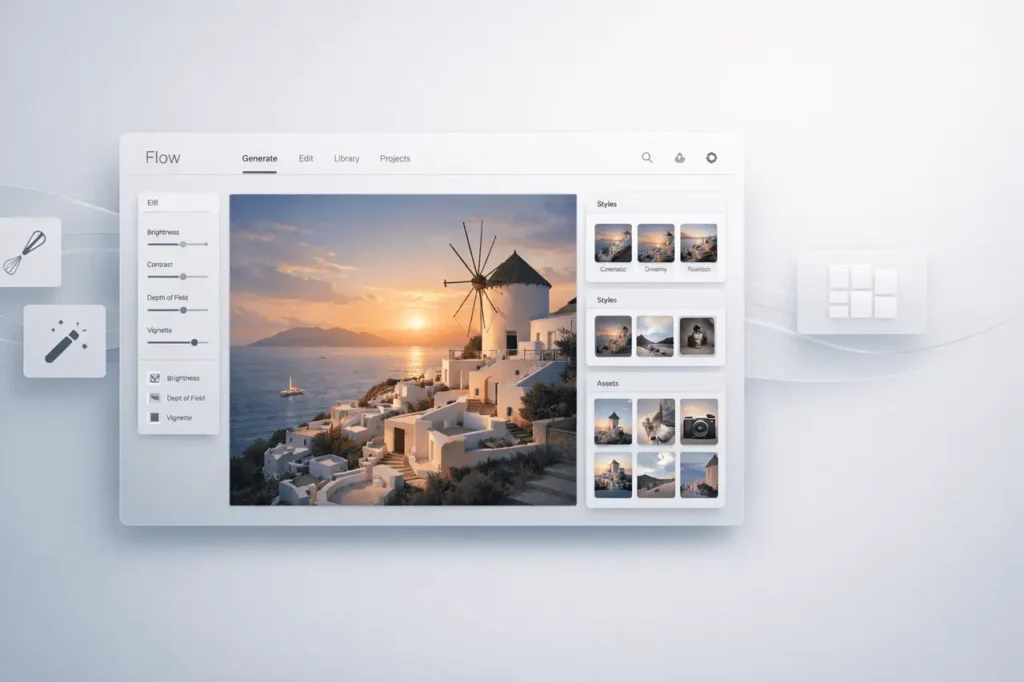
Google Flow AI Creative Studio is evolving into an extensive creative tool, with the Whisk and ImageFX experiments integrated directly into Flow. This change demonstrates Google’s desire to integrate AI-powered visual tools into a single, fully functional environment that includes cutting-edge editing tools, flexible asset management, and precise natural controls.
Instead of a myriad of experiments, artists now benefit from an integrated AI creative workflow that combines image editing, styling, and asset management into a single seamless interface.
What is Google Flow AI Creative Studio?
Google Flow AI Creative Studio is Google’s AI-powered, integrated creative platform for editing, image generation, and asset management. It integrates the most experimental tools, such as Whisk and ImageFX, into a single studio experience.
In the past, Whisk and ImageFX functioned as separate projects. In integrating them into Flow, Google transforms the platform into an incredibly robust AI content creation platform rather than a stand-alone tool.
Core Capabilities
- AI-powered image generation
- advanced editing and styling tools, as well as style personalisation
- Natural language editing controls
- Precision adjustment tools
- Flexible asset management system
This shift positions Flow as a central AI collaborative workspace rather than a fragmented collection of tools for experimentation.
Why are the Whisk and ImageFX move important?
The integration of Whisk and ImageFX into Google Flow AI Creative Studio is more than a UI change; it changes creators’ workflows.
from Experiments and Production Tools to
Previously:
- Whisk is a whisk focusing on the generative exploration.
- ImageFX enables creative image generation using an AI model.
Now:
- Both are directly embedded into Flow.
- Editing, generation and management all happen on the same interface.
- Creators can maintain continuity across their projects.
Lowering the friction in creative workflows and supporting an iterative AI process for design.
New Editing Tool and Style Control are now available.
One of the most significant enhancements to Google Flow AI Creative Studio is the introduction of new editing tools and expanded styling options.
Natural Editing
Natural editing allows designers to modify images using prompts from conversations rather than complicated handheld tools. This method helps reduce the learning curve and improves speed.
Examples of the natural editing capabilities:
- Lighting conditions that can be changed
- Changing visual styles
- Adjusting composition
- Refining the visual tone or texture
Precision Controls
Precision controls enhance natural language editing and allow more precise adjustments. The balance between easy prompts and precise controls is essential for professional workflows.
Flexible Asset Management System
A significant change in Google Flow AI Creative Studio is the ability to manage assets in various ways.
What does this enable?
- Organising created images in libraries that are structured
- Utilising assets in multiple projects
- Maintaining version control
- The management of styles and variations is effective
This is particularly useful for teams who produce:
- Marketing visuals
- Assets of the brand
- Product mockups
- Social media creative
Instead of creating content regularly, creators can manage and tweak existing assets in Flow.
Feature Comparison Table
Google Flow before vs. After Whisk & ImageFX Integration
| Feature | Before Integration | After Integration |
|---|---|---|
| Image Generation | Separate experimental tools | Unified within Flow |
| Editing Tools | Limited or experimental | Expanded editing suite |
| Style Controls | Basic prompt-driven styles | Advanced style adjustments |
| Asset Management | Minimal | Flexible asset organization |
| Workflow | Fragmented | Centralized AI creative studio |
This transition is the shift from experimentation towards a more structured artistic production.
How does Google Flow AI Creative Studio work?
Google Flow AI Creative Studio integrates the power of a generative AI model with tools for interactive editing.
Workflow Overview
- Generate an image using an AI model
- Use stylistic variants
- Refine using natural editing prompts
- Adjust with precise controls
- Save and manage assets in organised libraries
This complete workflow eliminates the need for multiple tools and other software.
Real-World Applications
Google Flow AI Creative Studio supports a wide range of professional applications.
1. Marketing and Advertising
- Rapid visual campaign prototyping
- A/B testing creative variations
- Brand-consistent asset creation
2. Design of Products
- Concept visualization
- Style exploration
- Iterative refinement
3. Content Creation
- Social media graphics
- Blog feature images
- Visual storytelling
4. Creative Agencies
- Asset management for teams
- Version-controlled changes
- Fast client iterations
Use Cases for Industry
| Industry | Primary Use | Key Benefit |
|---|---|---|
| E-commerce | Product mockups | Faster content production |
| Media & Publishing | Visual storytelling | Streamlined editing workflow |
| Design Agencies | Concept iteration | Precision control + asset reuse |
| Startups | Branding materials | Cost-efficient AI generation |
Benefits of Google Flow AI Creative Studio
1. Centralisation
Whisk and ImageFX no longer operate as separate experiments. Everything operates within a unified interface.
2. Improvement in Workflow Efficiency
Creators can create, edit, refine, and manage assets within the same environment.
3. Improved Control of Creative Control
A combination of editing natural languages with precise controls is a great option for beginners and professionals alike.
4. Scalable Asset Management
Teams can maintain organised asset libraries for long-term projects.
Limitations and considerations
Although Google Flow AI Creative Studio is a significant advancement, the user should be aware of:
- The learning curve of advanced precision tools
- Dependence on outputs generated by AI
- The need for workflow adaptation in the transition from conventional design programs
As with other AI platforms for design, the quality of results depends on delivery speed and continual improvement.
How Does It Compare to Traditional Creative Workflows?
| Traditional Approach | Google Flow AI Creative Studio |
|---|---|
| Manual design from scratch | AI-assisted generation |
| Multiple disconnected tools | Unified platform |
| Heavy file management | Integrated asset management |
| Time-intensive revisions | Natural language editing |
This AI-driven process speeds up creativity while preserving flexibility.
The Strategic Importance of This Move
Transforming Flow into a complete AI Creative Studio suggests a longer-term strategy
- Consolidate experimental AI tools
- Transition from research-phase projects into production-grade platforms
- Creators can be supported by the ability to scale AI infrastructure
This coincides with the industry-wide trend towards integrating AI design ecosystems rather than individual generative tools.
My Final Thoughts
Google Flow AI Creative Studio is a significant shift away from naive AI image tools toward an integrated artistic production system. By integrating Whisk with ImageFX, Google has centralised the generation of image edits, styling customisation, and asset management into a single system.
This advancement improves workflow efficiency, increases creativity, and facilitates scalable team collaboration. While AI-powered design software keeps evolving, platforms such as Google Flow AI Creative Studio suggest a future in which the production of creative ideas will be more efficient, intuitive, and fully integrated.
The shift from scattered experiments into a more structured AI creative studio is an important step in the development of AI-driven visual production.
FAQs
1. What exactly is Google Flow AI Creative Studio?
Google Flow AI Creative Studio is an integrated AI-powered platform that combines images, editing tools, control styles, and asset management in a unified environment.
2. What has happened to Whisk as well as ImageFX?
Whisk and ImageFX are now integrated directly into Google Flow, becoming part of the creative studio in general rather than separate tools previously considered experimental.
3. What new capabilities have been added to Flow?
The new features are improved editing tools, more style options, natural language editing, precise controls, and an incredibly flexible system for managing assets.
4. How do natural editing functions in Flow?
Natural editing lets users edit images by responding to conversational prompts, changing the lighting, style or composition with no manual editing effort.
5. Are Google Flow suitable for professional teams?
Yes. Through asset administration and precise control, Google Flow AI Creative Studio enables collaboration workflows for teams, branding asset organisation, and scalable creative production.
6. What makes Flow different from conventional design software?
In contrast to traditional tools that rely on manual design and disconnected process workflows, Flow integrates AI-generated editing, creation, and asset management into a single software platform.
Also Read –
Google Lab Opal AI Workflow Builder Gets Smarter with Agent Upgrade