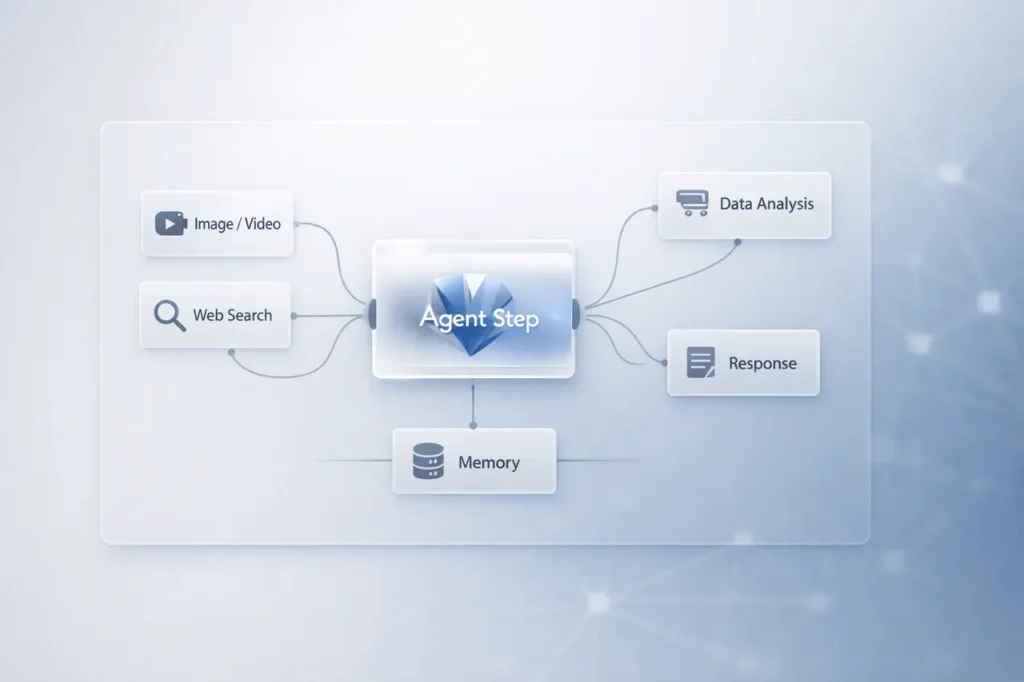
The Google Lab Opal AI workflow builder has received a major enhancement that aims to make non-code AI automation more flexible, intelligent, and autonomous. The latest update adds an advanced agent step that analyses goals, determines the most efficient execution method, and then uses the right tools, such as video generation or web research, for complex tasks.
It was developed within Google Labs research and Innovation ecosystem. Opal stands out as an open-source visualisation AI workflow builder that connects automated, structured systems with self-contained AI agents. With the addition of new features such as memory, dynamic routing, and interactive chat, it is moving closer to achieving true agentic AI orchestration.
What is the Google Lab Opal?
Google Lab Opal is a visual, no-code builder for creating AI workflows. It lets users design multi-step automation workflows with a visually-based interface instead of writing code.
Instead of manual linking tools, users can define goals and organise their workflow visually. Opal can then coordinate AI models, research tools, and generation systems to carry out this workflow.
The basic principles that underlie Opal:
- Visual drag-and-drop workflow design
- Tool-based AI orchestration
- Automation with no programming
- Modular, reusable workflow steps
The latest update dramatically improves how these workflows run.
What’s New in the Opal Upgrade?
The update adds four key capabilities:
- Agent Step (Autonomous Decision Layer)
- Memory across Sessions
- Dynamic Routing using “at Go To”
- Interactive Chat to replace inputs
Each feature increases the automation capabilities rather than expanding access to tools.
A New Agent Step Automation of AI Workflows
The most powerful change can be described as a new step for agents.
Instead of a rigid step-by-step procedure, the agent can:
- Analyses the purpose of the user
- Determines the most effective method
- Selects the appropriate tools
- Runs this workflow in a dynamic manner
For instance, if the job involves creating a video, an agent could use a video creation tool like Veo. If research is necessary, the agent can use web search capabilities. This can reduce the manual effort required for branching workflows and decision-making.
What Does It Mean for the Workflow Design?
Before this update:
- Users specified each step in detail.
- Tool selection was made before.
- Logic needed to be manually arranged.
Following the update:
- The agent interprets the intention.
- It decides on its own tools.
- Execution is tailored to the job’s context.
This is a transition from static automation towards goal-driven AI workflows.
Memory: Persistent Context Across Sessions
The latest memory technology enables Opal to retain context information across sessions.
Examples include:
- A user’s name
- Brand voice preferences
- Formatting style choices
- Recurring project parameters
Why is Memory Important?
Without memory
- Every workflow begins with a blank slate.
- Users must re-enter preferences.
Memory:
- The system becomes progressively personalised.
- Output consistency improves.
- Repetitive setup tasks are fewer.
This feature aligns with Opal’s better approach to long-running AI assistants and persistent agents.
Dynamic Routing Flexible Workflow Navigation
Dynamic routing provides the capability for the agent to identify the best next step with”@ Go to” tool “@ Go To” tool.
Instead of linear execution, workflows are:
- Branch in a conditional manner
- Redirect mid-process
- Adjust according to intermediate results
Classic vs Dynamic Workflow Execution
The dynamic routing of HTML0 is crucial for:
- Complex research workflows
- Multi-output content generation
- Automating based on decision-making
- Interactive user-driven flows
It is genuine workflow intelligence, not scripted branching.
Interactive Chat: Human-in-the-Loop AI
The brand new interactive chat function permits agents to:
- Ask users for missing information
- Present options
- Clarify ambiguous goals
- Confirm decisions before execution
This prevents failure due to incomplete input.
Example Use Cases
- Tone is required before making content
- Requesting file format preferences
- Confirming video style before rendering
- Additional research constraints for gathering
Interactive chat turns Opal from being a passive executor into an active partner.
Feature Comparison Table
Following is a well-organised review of the new capabilities of Opal:
| Feature | What It Does | Business Impact |
|---|---|---|
| Agent Step | Analyzes goals and selects tools | Reduces manual workflow setup |
| Memory | Stores preferences across sessions | Improves personalization |
| Dynamic Routing | Chooses next steps contextually | Enables adaptive automation |
| Interactive Chat | Requests missing user input | Reduces execution errors |
These improvements collectively shift Opal towards AI-agent automation rather than established workflows.
Why is this upgrade important in AI Automation?
The wider AI industry is moving towards autonomous agents that can make decisions and orchestrate tools. Google Labs’ recent upgrade reflects this change.
Key implications:
- Reduction in the need for complex manual logic
- A more scalable workflow design
- Improved personalisation at scale
- Smarter tool coordination
It puts Opal in the context of emerging agent platforms that prioritise independence over rigid pipelines.
For companies, this refers to:
- Prototyping faster for AI processes
- Lower the barrier to automation’s technical development
- More adaptability to research, content, and creative workflows
Real-World Applications
The Google Lab’s enhanced OPAL AI workflow creator can help:
1. Content Production
- Research – Draft – Review – Video generation
- Style personalisation using memory
2. Marketing Automation
- Audience research
- Content variation testing
- Multi-format output generation
3. Research Workflows
- Dynamic web search integration
- Context-aware report generation
4. Creative Media
- Automated video generation
- Refinement of the script using interactive chat rooms
The ability to call dynamic tools, such as video generators or search engines, is what makes Opal particularly beneficial for multimedia-related workflows.
Benefits and Limitations
Benefits
- No-code accessibility
- Intelligent tool orchestration
- Persistent memory
- Adaptive execution
- Manual branching is reduced
Limitations
- Relying on tools that are integrated
- Autonomous routing may require oversight in high-stakes workflows
- Complex workflows might require testing and re-evaluation
Like other AI workflow tools, human validation is essential for use cases that require mission-critical accuracy.
My Final Thoughts
Google Lab Opal AI workflow creator update represents a significant evolution from static automation to agent-driven orchestration. The introduction of the autonomous agent, step memory, persistence, dynamic routing, and chat with interactive Capabilities moves Opal closer to an intelligent, flexible AI system.
These improvements reflect the shift towards agentic AI, where systems analyse goals, choose tools autonomously, and adapt their execution in real time.
As AI workflows become more complex, systems such as Opal illustrate how visual non-code builders can incorporate autonomy without sacrificing accessibility. The future of AI automation isn’t just speedy, it’s more efficient, more contextual and more self-directed.
Frequently Answered Questions (FAQs)
1. What is Google Lab Opal AI workflow builder?
It’s a non-code visual platform that lets users create AI workflows. The most recent update introduces the ability to automate with agents, memory, and dynamic routing.
2. What happens when the new agent’s steps work?
This agent examines the user’s goals and determines the best strategy, then it automatically selects and connects to the right tools needed to accomplish the task.
3. What is dynamic routing? In Opal?
Dynamic routing enables the agent to decide on the next stage of execution, rather than following a strict predefined sequence.
4. Does Opal remember user preferences?
Yes. This new feature allows the system to retain information such as the user’s style preferences and even personal information throughout sessions.
5. Is Opal used to interact with users during the course of a workflow?
Yes. Interactive chat lets the agent request more information or clarify choices before proceeding.
6. Is Opal appropriate for users who are not technical?
Yes. It was designed to be an uncoded visual builder, making it available to people without programming skills.
Also Read –
Google Opal Agent Builder Introduces Interactive Steps for Smarter Gemini Agents