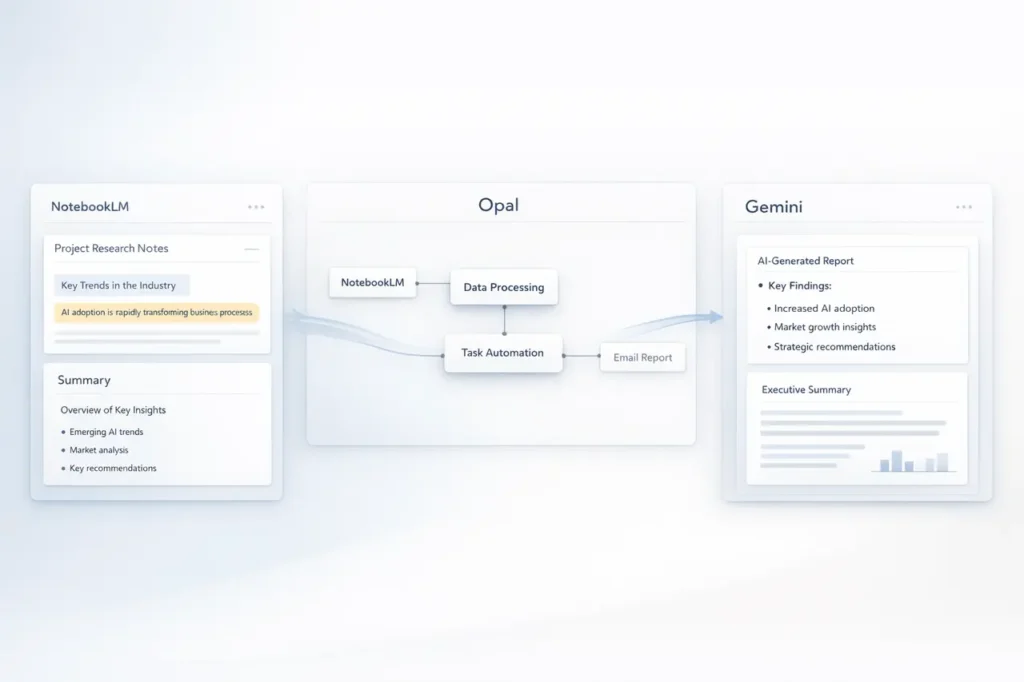
At the beginning of 2026, Google began testing a significant improvement in how users can build AI-driven automation by integrating NotebookLM into Opal. Opal software for workflow creation. This advancement allows researchers, knowledge workers, and automation developers to directly incorporate the individual notebook’s context into automated pipelines and then use it in Super Gems on Google’s advanced AI platform, Gemini.
This article explains NotebookLM Opal Integration, what this integration is, what it means, why it’s important, and how it can improve notebooks, AI workflows, and contextually aware automation.
What Is NotebookLM?
NotebookLM (short for Notebook Language Model) is an AI-powered research notebook created by Google Labs that uses Google Gemini to analyse uploaded content and generate insights.
Core Capabilities
- Processes various content types, including PDFs, Google Slides, websites, and much more.
- Creates explanations, summaries, and solutions directly from the user’s sources.
- Research materials are organised and transformed into a structured base.
NotebookLM acts as a personal assistant to research that “knows” the contents of your documents. NotebookLM can respond to questions based on specific sources, thus reducing the risk of errors from general large-language model hallucinations.
What are Opal and Super Gems on Gemini?
Opal is Google’s zero-code workflow builder, created in Google Labs. It allows users to visually design multi-step processes that link logic, data, and AI-driven decisions without writing code.
In late 2025, Opal was folded into Gemini AI and rebranded as part of a larger workflow system called “Super Gems.” This new system incorporates Opal’s automation capabilities within Gemini. A Gemini environment that allows workflow creators and AI assistants to communicate seamlessly.
How Opal and Super Gems Work Together
- Opal workflows provide steps, data sources and the logic.
- Super Gems contain reusable AI behaviour within Gemini, using both context and instructions.
- With NotebookLM included, workflows can now access extensive user-generated research during execution.
What the NotebookLM Opal Integration Means?
The integration currently being tested allows people to bring in NotebookLM notebooks into Opal workflows natively. This means that instead of manually copying documents or notes into workflows, you can attach Notebooks and refer to their contents directly.
In practical terms:
- Your NotebookLM notebook appears as a tile you can select in Opal’s canvas.
- It is possible to connect the tile to other workflow blocks via a database or an API.
- While a workflow is running, actions such as “Generate Content” can pull relevant data from the notebook via natural-language prompts.
Why This Matters?
In the absence of this option, notebooks function as static sources of information that you can manually access and copy information into the generation process. The integration transforms notebooks into active, permanent knowledge layers that workflow automation can utilise dynamically, much like the retrieval-augmented generation (RAG) system, tuned to your specific research.
Benefits of Notebook-Powered Workflows
More Grounded, Accurate Outputs
By feeding workflow actions directly from your carefully curated NotebookLM sources, your process is more likely deliver accurate, reliable results, particularly for more complex tasks such as research summaries, data-driven reports or other domain-specific content.
Seamless Knowledge Reuse
- There is no requirement to re-upload files across different platforms.
- Notebooks are reusable data sources rather than single inputs.
- Workflow steps may refer to the same notebook repeatedly.
Enhanced Automation Flexibility
Notebook context can now fuel:
- Automatic content creation based on actual grounding
- Steps to extract data, based on your study
- AI aid that “knows” the context of your domain beyond the generic internet information
Limitations and Considerations
Although it’s promising, this integration is not without its limitations:
- It is being vetted internally, and there is no publicly announced timeframe for a general release.
- Feature availability can vary based on Google account, location, or subscription.
- Like any AI-powered device, output quality depends on how the prompts and connectors are set up.
NotebookLM and Gemini Integration: A Broader Context
Although it is not part of Opal processes, Google is advancing the way NotebookLM works to Gemini:
- Users can also add NotebookLM notebooks for knowledge resources from inside the Gemini app.
- This is expanding the ways notebook context can be utilised to assist with conversational AI, document generation, and multimedia tools.
This wider trend demonstrates Google’s efforts to make personal research notebooks part of the backbone of context, not just storage.
Integrating NotebookLM into Workflows: Quick Comparison
| Capability | Without Integration | With NotebookLM Integration |
|---|---|---|
| Workflow access to user research | Manual copy-paste only | Direct reference via workflow blocks |
| Context accuracy | Depends on prompt engineering | Grounded in curated notebook content |
| Workflow automation complexity | Limited | Enables research-driven automation |
| Reusability of data | One-off inputs | Persistent knowledge layer |
My Final Thoughts
The integration of Google’s NotebookLM into Opal workflows, particularly when combined with Super Gems on Gemini, represents a significant change in how users build contextually aware, research-driven automation. Instead of treating NotebookLM as static reference files, they’re now active data resources that power AI workflows by incorporating rich, user-generated data.
As the use of generative AI expands into business and productivity areas, the foundation of automated processes on reliable research, not patterns that are universally distributed, will increase reliability, relevance, and user trust. NotebookLM’s integration with Opal indicates a time when advanced automation fully understands your data, not just languages.
FAQs
1. What are the most significant benefits of the integration of NotebookLM to Opal workflows?
It allows workflows to access and use knowledge from NotebookLM notebooks directly, reducing manual data transfer and expanding the knowledge base in a real-world context.
2. Does the integration now work for everyone?
No. It is currently being tested, and Google hasn’t announced a public release date.
3. How does this integration relate to Super Gems on Gemini?
Notebooks integrated into Opal will now be able to provide context for Super Gems, allowing AI-driven behaviour to be embedded in notebook content.
4. Is it possible to use NotebookLM with the Gemini app with no Opal?
Indeed, Workspace users can already integrate NotebookLM notebooks as sources of knowledge within Gemini.
5. Do I require advanced technical expertise to use this integration?
The integration enables the creation of no-code workflows and is therefore accessible to those without programming skills.
6. Can this integration help improve AI output precision?
In establishing workflows for the curated notebook content, outputs will be more useful and precise than relying on unrelated context.
Also Read –